Music Tracker
The JARU IDE Music Tracker is the integrated editor for creating sequenced music inside a JARU project. It is designed for chiptune music, game melodies, intros, menus, demos, and short musical effects that can later be played by JARU VMs through the Sound module.
Instead of working with a fixed audio track such as MP3 or OGG, the tracker stores notes, instruments, tempo, volume, and commands in an editable format. During the build, JARU IDE compiles that resource into a compact binary file that the VM can load and play.

Workflow
The complete Music Tracker workflow is:
JARU IDE Music Tracker
  -> saves Music/*.jms
  -> Resource Builder compiles the song
  -> generates Build/flash/Music/*.jmu
  -> the VM plays the .jmu with Sound.loadMusic()
This lets music behave like a project resource, next to images, sprites, maps, or source code. The user edits the song visually in the IDE, and the build system converts it to the format understood by the VM.
Editable .jms Format
.jms files are the editable music resources used by a JARU project. Internally, they store the song as tracker data: global settings, instruments, and rows.
A .jms file contains information such as:
format: identifies the resource as a tracker song.tickMs: base duration of a music tick.volume: initial global volume.loop: whether the song should loop.loopStartRow: row where the loop begins.rowTicks: default duration of each row.instruments: list of chiptune instruments.rows: tracker rows with notes, instruments, volume, note-off events, and commands.
Simplified example:
{
  "version": 1,
  "format": "tracker",
  "tickMs": 72,
  "volume": 185,
  "loop": true,
  "loopStartRow": 0,
  "rowTicks": 8,
  "instruments": [
    { "id": 0, "name": "Pulse", "type": "tone", "wave": "pulse", "volume": 154, "duty": 18 },
    { "id": 3, "name": "Snare", "type": "noise", "noiseMode": "white", "volume": 113, "decayTicks": 3 }
  ],
  "rows": [
    { "ch0": { "note": 60, "inst": 0 }, "cmd": { "type": "tempo", "tickMs": 72 } },
    { "noise": { "period": 5, "inst": 3 } },
    { "cmd": { "type": "end" } }
  ]
}
The user normally does not need to edit this JSON by hand. JARU IDE loads it, displays it as a tracker, and saves it from the visual interface.
Export to .jmu
The .jmu format is the compiled output of a JARU song. It is a compact binary file designed so the VM can play music without loading an editor or processing the original JSON.
During the build:
- JARU IDE locates the music resources in the project.
- The music compiler reads the
.jmsfiles. - It validates rows, channels, instruments, and commands.
- It writes the musical data to
.jmu. - It copies the result into the generated resource folder, usually
Build/flash/Music.
The .jms file is the working format. The .jmu file is the runtime format.
Rows, Channels, and Commands
The main interface organizes the song into rows. Each row can contain information for several channels:
- Tone channels for melody, bass, or harmony.
- A noise channel for percussion and effects.
- A command column for tempo, song end, loops, and other playback controls.
Cells can represent:
- A musical note, such as
C-4orD#5. - An empty or unchanged cell, such as
---. - A note-off event, such as
OFF. - An instrument assigned to the note.
- Per-cell volume when dynamic control is needed.
- Global playback commands.
The editor also includes controls for tempo, volume, row duration, and looping.
MIDI Import
The MIDI importer converts a .mid or .midi file into a song editable by the tracker. It does not play MIDI directly; instead, it adapts the musical content to JARU channels, instruments, and commands.
The importer can:
- Analyze MIDI channels and tracks.
- Quantize notes to the tracker resolution.
- Assign voices to tone channels.
- Import percussion as a noise channel when possible.
- Preserve tempo changes.
- Adapt volume, pitch bend, and modulation when they fit the JARU format.
After import, the song becomes a .jms resource, so it can be edited, adjusted, and compiled like a song created from scratch.
Instrument Editor
The Music Tracker includes a chiptune instrument editor. Instruments define how tracker notes sound.
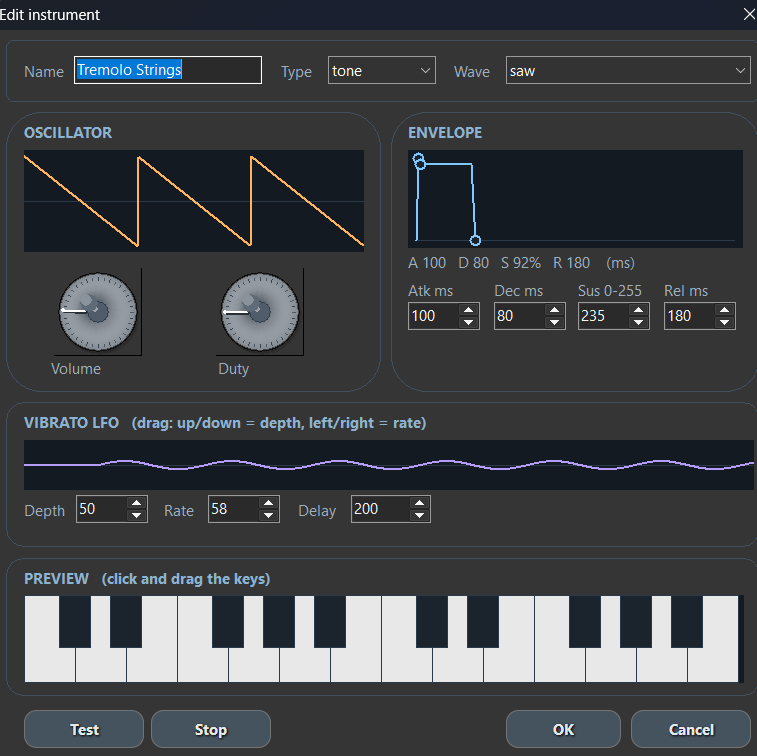
Instruments can configure:
- Type:
toneornoise. - Waveform:
square,triangle,saw,pulse, orsine. - Volume.
- Duty for pulse sounds.
- ADSR envelope: attack, decay, sustain, and release.
- Vibrato LFO: depth, rate, and delay.
- Noise parameters for percussion or effects.
The editor includes preview playback to test a sound before using it in a song.
Playback with Sound.loadMusic
Once compiled, the song can be played from JARU code with the Sound module:
use Sound

Sound.init()

if (Sound.loadMusic("Music/theme.jmu")) then
    Sound.playMusic(true)
end
Playback can also be controlled with functions such as:
Sound.playMusic(loop)Sound.pauseMusic()Sound.resumeMusic()Sound.stopMusic()Sound.seekMusic(ms)Sound.unloadMusic()
For more detail about the audio runtime, see the Sound module reference.
Current Limitations
The Music Tracker is in development and may still change. The main current limitations are:
- The
.jmsformat is designed as JARU IDE's internal editable format. - MIDI import is an approximate conversion, not full MIDI playback.
- Sequenced music uses the
.jmuformat; it does not replace PCM audio when samples are needed. - MIDI import quality depends on the complexity of the original song and how its channels are assigned to the tracker.
- Some instrument options, commands, or editor ergonomics may evolve in future versions.
The goal is for the Music Tracker to become a practical tool for creating lightweight, editable, portable music inside the JARU ecosystem.