Games and projects for ESP32, built in one place
JARU is a simple programming language and an IDE for Windows. Write your program, test it on the PC with no board, and send it to the board with one button.
Free · 64-bit Windows 10 and 11

- 4
- chips: ESP32, S3, P4 and S31
- 13
- boards with a ready profile
- 20
- modules: display, sound, network…
- 38
- examples in the installer
New in 0.9.8
Claude and Codex, working inside the IDE
JARU IDE speaks MCP, the protocol of AI assistants. Connect Claude or Codex with one button and ask in your own words: you see what they do in the IDE.
- They read the project, change the code, build, run and debug.
- They draw sprites, set up rooms and tilemaps and write the music.
- They play the game by pressing keys, to check that it works.
- You see who is working, and nothing is sent to a board unless you accept it.
Made with JARU
This is what you can make
Games and demos written in JARU, on the Windows VM. Sprites, tilemaps, physics and sound come from the language modules, and the same code runs on an ESP32 board.
Browse the examples on GitHubHow you work
From code to board in three steps
Write
The editor colors the code, completes names and underlines errors as you type, without waiting for a compile.
The code editorTest on Windows
Run executes the program on the Windows VM. The debugger stops it where you say, and the GPIO simulator stands in for LEDs, buttons and sensors.
The debuggerTake it to the board
Pick your board in Build › Target and press Run: the IDE compiles the program, uploads it and the board starts it.
Your program on a board
JARU IDE
Everything a game needs, and the hardware
You need no other program to draw, build the rooms, compose the music or flash the board.
Scene editor
Build the rooms of a game without writing code: tile and image layers, and objects with behaviours, rules and states. The IDE turns each room into JARU code.
How to use it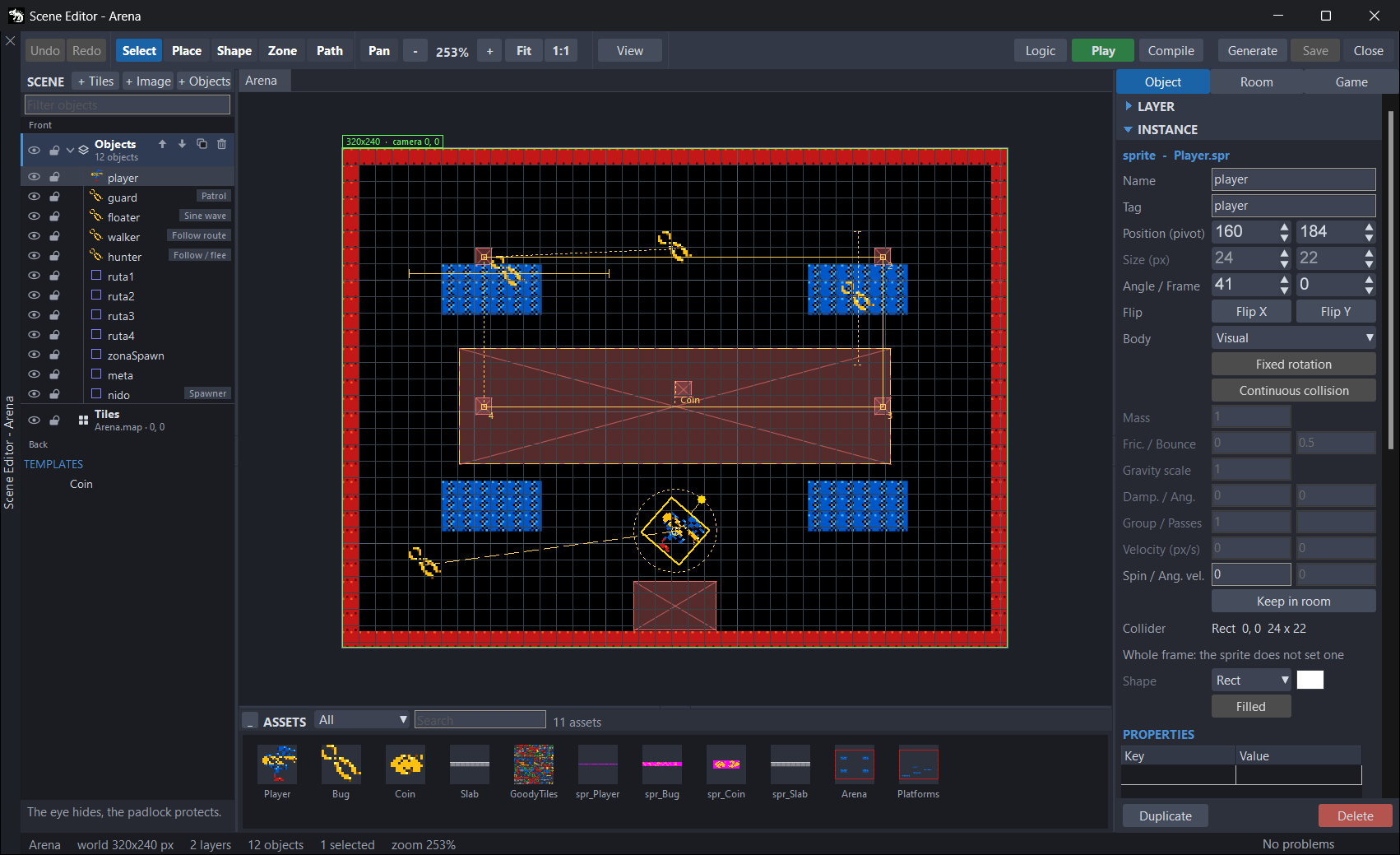
The language
It reads the way you think
JARU is a dynamically typed language, with classes and a garbage collector, made to fit in a microcontroller.
- Blocks with end: no braces and no mandatory indentation.
- Classes with inheritance, structs, anonymous functions and try and catch.
- Display.fps gives games the same pace on Windows and on every board.
- The same program, unchanged, on the Windows VM and on the board.
use Display

Display.open(320, 240)
Display.fps = 30                     // 30 frames per second

var draw = Display.draw
draw.colorBG = 0x102040              // the color update() clears the display with

var x = 160.0
var y = 120.0
var vx = 90.0                        // pixels per second
var vy = 60.0
while (true)
    draw.color = 0xFFCC00
    draw.circle(x, y, 10, true)
    draw.text(8, 8, "Hello, JARU", 0xFFFFFF)
    Display.update()                 // shows the frame and waits for the next one

    x = x + vx * Display.dt
    y = y + vy * Display.dt
    if (x < 10 or x > Display.viewWidth - 10) then
        vx = -vx
    end
    if (y < 10 or y > Display.viewHeight - 10) then
        vy = -vy
    end
end
Boards
Your board, already set up
The IDE ships the VM firmware for each chip and the profile of 13 boards: pick yours and the display, sound and pins are set.
ESP32
SPI displays
- LILYGO T4 v1.3
- Diymore ESP32 2.8
- Binghe ESP32 1.96
ESP32-S3
SPI, QSPI and i80 displays
- JARU JaruCade
- Waveshare ESP32-S3-Touch-LCD-2.8
- Waveshare ESP32-S3-Touch-AMOLED-1.8
- Freenove FNK0086
- Freenove FNK0104
- LILYGO T-Watch S3
- Wireless-Tag WT32-SC01 Plus
ESP32-P4
RISC-V, MIPI-DSI displays
- Waveshare ESP32-P4-WIFI6-Touch-LCD-4.3
- Waveshare ESP32-P4-WIFI6-Touch-LCD-4B
ESP32-S31
RISC-V, new in 0.9.7
- Espressif ESP32-S31-Korvo-1
From concept to creation, it all starts with a line
Install the IDE, open an example and press Run. The board can wait: everything works on Windows first.
Free · 64-bit Windows 10 and 11
JARU is a personal, independent project. It started as a way to learn how a compiler and a virtual machine are made, and grew into a complete IDE. It is free.