JARU 0.9.8: Claude and Codex work inside the IDE

JARU 0.9.8 is out. If 0.9.7 was the release of the scene editor and of speed on the board, this one is about AI assistants: Claude and Codex connect to JARU IDE and work inside it. They read your project, change the code, build, run, debug and edit the rooms, the tilemaps, the images and the music, with the IDE in front of you and under your control.
There is also a code editor that stops marking errors that are not errors, and a few fixes in the debugger and the physics. Nothing changes in the language or in the API: the only thing to do when you upgrade is to flash the new firmware on your boards.
AI assistants inside the IDE
JARU IDE now speaks MCP (Model Context Protocol), the protocol an AI assistant uses to drive other programs. The assistant is a separate program, with your account: Claude Desktop, Codex or Claude Code. You ask in your own words in its window, and you see what it does in the IDE: the code changes in the editor, the room in the scene editor, and the game opens on your screen.
There is no need to teach it JARU. The IDE itself gives it the reference of the language, the modules, the behaviours and the rules, and lets it see the errors the editor marks and what the compiler says.
Connected with a checkbox and a button
The connection comes turned off. You turn it on in Config › IDE › Settings, with the Let AI assistants connect to this IDE (MCP) checkbox and Apply config: at once, without restarting the IDE.

Next to the checkbox there is a button for each assistant:
- Connect Claude hands the JARU IDE extension to Claude Desktop, and Claude shows it with its install button. It also works for the Code tab of Claude Desktop.
- Connect Codex adds JARU IDE to the Codex configuration. It asks first, keeps a copy of the file and touches nothing else in it.
There are no configuration files to edit and no paths to look for. If you use Claude Code, the one in the terminal, you connect it with a command. The whole process, step by step and with what to do if something doesn't work, is in Connecting an AI assistant.
What it can do
There are 62 tools, and they cover almost everything you do in the IDE:
- Project and code: see the files, create a project, create, rename and delete files, read the errors the editor marks and change the text in the editor itself, where you see it and can undo it.
- Build and run: build, run on Windows, read what the program prints and stop it.
- The running game: see a capture of its window, press keys and pause it to play it one press at a time.
- Debugger: set breakpoints, step and read variables.
- Rooms and tilemaps: create rooms and change their objects, layers, rules, variables and settings; create tilemaps and change their cells.
- Images, sprites and music: draw images, define the frames and the animation of a sprite, write a whole piece of music with its instruments or bring one from a MIDI file.
- Boards: see the boards of the project and the ports, read what a board prints and send the program when you accept it.
You ask as you would ask a person who has the IDE in front of them:
Build the project and fix the errors that come up.
The player falls through the floor. Use the debugger to see why.
Add to the room a platform that moves from side to side.
It helps to tell it what you want to achieve, and not only what to change: it builds, runs and checks whether it worked by itself. More requests to start with and what to keep in mind are in Working with an AI assistant.
A game made from start to finish
To see how far it goes, I asked Claude for a small game in a new project, with graphics and with music, without touching the IDE myself. It drew the tiles and the sprites, made the tilemap, wrote the music, set up the room with its rules, wrote the code, built it and played the game by itself to check that it worked. It took 39 commands to have the game building, and it built the first time.
It is not a game to show off: it is an example of how the work goes. The whole process, with every step and what was left written in the IDE, is in A game made with an assistant.
You see who is working
Letting a program change your project calls for knowing, at any moment, what it is doing:
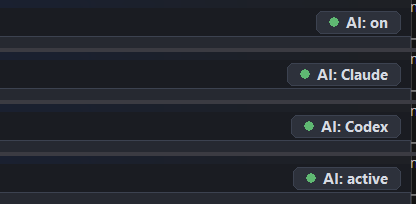
- A badge in the ribbon says AI: Claude or AI: Codex while the assistant does something, and goes back to AI: on 10 seconds after the last thing it did.
- Output keeps everything it asks for, with
[CLAUDE]or[CODEX]in front. - An assistant can't flash a board on its own. To send the program to a board, JARU IDE asks you every time in a dialog that says which assistant is asking, which project, which board and which port. If you don't answer, the answer is no.
- Code and rooms can be undone. The images, sprites and tilemaps it changes are saved at once, so before a big change it is worth saving a version of the project with Git.
An editor that no longer marks false errors
The code editor marked as errors code that compiled. There were four causes, all four closed:
- A file of the program now sees what all the others declare, as when running. A game split into several files came out full of "is not defined".
- An
importof a file that is on disk but not in the project tree is resolved, as the compiler does. - A string with an escaped quote (
\") is read whole. Before, it was cut there and the rest was read as code. Display.draw.coloris no longer marked, and a variable is no longer taken for a module.
The editor also reloads what changes on disk: if another program changes a file you have open and untouched, the tab reloads by itself. If you had unsaved changes it is left alone, and the IDE warns you before overwriting what is on disk.
Debugger and physics
- The Watch window no longer loses readings. With the program stopped, some rows kept the value from the previous stop.
- A breakpoint set before starting also fires in a large program. Before, it never fired.
- Run on a board no longer leaves the ribbon as if it were still building, with Run, Stop and Debug greyed out.
- One-way platforms: in a room with several physics steps per frame, a body could fall through one when landing. Fixed in the Windows VM and in the firmware of every board.
Breaking changes
| Change | What to do |
|---|---|
| Programs compiled with 0.9.8 need the 0.9.8 firmware | Flash the VM on each board with Flash Firmware before uploading programs |
That is all: 0.9.7 programs compile and work the same. The full list, with the fixes and the known issues, is in the release notes, which are also installed with the IDE.
Download
JARU IDE 0.9.8 for Windows is available on the site:
Unzip the file and run the installer inside it. If you already have the IDE installed, it will tell you there is a new version; it installs over 0.9.7, with no need to uninstall first.
FAQ
Do I have to flash my boards again?
Yes, once: Flash Firmware on each board. A 0.9.7 firmware does not load programs compiled with 0.9.8, and it says so: "Program version 0.9.8 uses bytecode newer than this VM (0.9.7). Update the firmware from the IDE".
Do I have to change anything in my 0.9.7 projects?
No. There are no changes in the language or in the API.
Does JARU IDE come with an AI assistant?
No. Claude Desktop and Codex are separate programs, with your account, and JARU IDE asks for no key for this. What the IDE brings is the connection: the checkbox, the two buttons and the tools the assistant uses.
Can an assistant touch my project without my knowing?
It only works with JARU IDE open and the connection on, which comes turned off. While it does something, the ribbon badge says who it is, and everything it asks for is written in Output. And it never sends anything to a board unless you accept it in a dialog of the IDE.
Is it the same as AI Agents?
No. AI Agents is still where it was, in Settings: there it is the IDE that calls a model, with your key, to generate I2C drivers. With the assistants it is the other way round: the assistant is the one driving the IDE.