Music Tracker in JARU IDE: chiptune music for games and demos

One of the features I am adding to JARU IDE is an integrated Music Tracker. I wanted music to be part of the project itself, not something external: a resource that can be created, edited, tested, and compiled from the IDE, just like code, images, or sprites.
The idea is simple: users should be able to compose a chiptune melody, import a MIDI file, adapt retro-style game music, and then use it in presentations, demos, games, or interactive applications made with JARU.
To make that work, the Music Tracker uses compact music resources: the project stores editable songs as .jms, the build system compiles them to .jmu, and JARU VMs can play them from code through the Sound module.
What the JARU Music Tracker is
The JARU Music Tracker is a row-and-channel music editor inspired by classic trackers, but integrated into the normal workflow of a JARU project. Instead of depending on WAV, MP3, or OGG files for every song, the tracker generates sequenced music: notes, instruments, volume, tempo, commands, and compact events.

The editor is designed for chiptune music, game intros, title screens, short musical effects, menus, and technical demos where the audio should be lightweight, editable, and playable by the VM.
How it fits into a JARU project
The intended workflow is direct:
JARU IDE Music Tracker
  -> saves Music/*.jms
  -> the build compiles the song
  -> generates Build/flash/Music/*.jmu
  -> the VM plays the .jmu with Sound.loadMusic()
This lets music behave like any other project resource, next to code, images, sprites, or maps. The user does not need to edit JSON manually: they work through a visual interface and the IDE handles saving and compiling the resource.
Rows, channels, and commands
The main tracker view organizes the song into rows. Each row can contain notes, instruments, volume, note-off events, or commands. The editor uses several channels:
- Tone channels for melody, harmony, and bass.
- A noise channel for percussion or effects.
- A command column for tempo, endings, loops, and other playback controls.
It also includes song-level controls such as tempo, global volume, row duration, loop enabled, and loop start row. This lets a song behave either as a linear piece or as looping background music.
Virtual keyboard and recording
The tracker includes a virtual keyboard for testing notes with the selected instrument. The computer keyboard can also play two chromatic octaves and preview the sound without modifying the song.
When REC mode is enabled, played notes are written into the current tracker cell and the cursor advances to the next row. This makes melody entry faster than editing every note manually in the grid.
Chiptune instrument editor
Beyond note editing, I have added an instrument editor for designing chiptune sounds. Instruments can control waveform, volume, pulse duty, envelope, and vibrato.
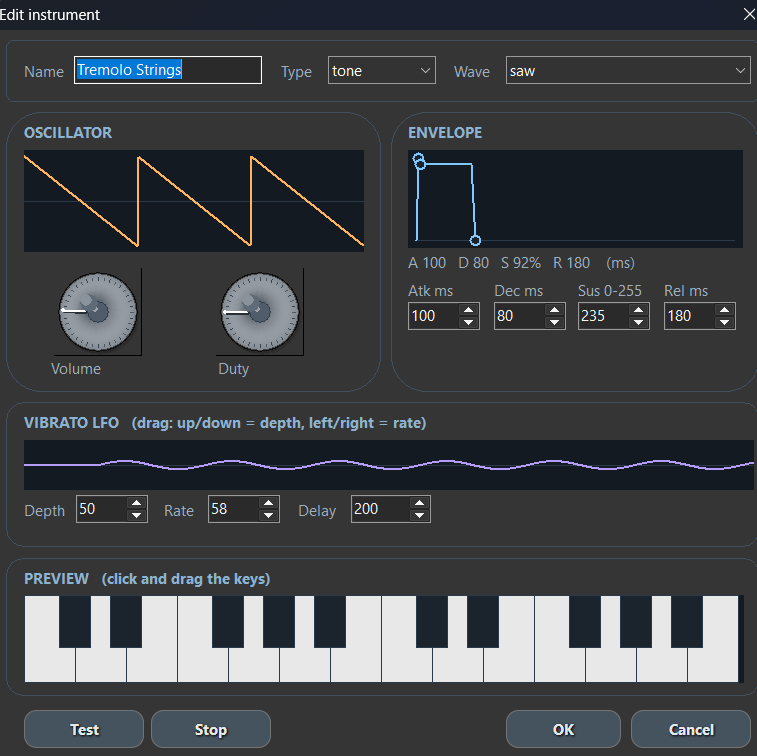
The editor lets users work with parameters such as:
- Instrument type: tone or noise.
- Tone waveforms such as square, triangle, saw, pulse, or sine.
- Volume and duty.
- ADSR envelope with attack, decay, sustain, and release.
- Vibrato LFO with depth, rate, and delay.
- Direct preview from a small keyboard.
This makes it possible to create leads, basses, simple pads, effects, and percussion without leaving the IDE.
MIDI to JARU music converter
One especially useful part I am adding is the MIDI importer. The goal is not to play MIDI as a general-purpose synthesizer, but to convert a MIDI song into a structure JARU can edit and compile.
The importer can analyze MIDI channels, quantize notes, assign voices to tracker channels, import drums as noise, and preserve useful musical information such as tempo changes, volume, pitch bend, or modulation when it can be adapted to the JARU format.
This opens up a practical workflow: take a retro melody or reference song in MIDI, import it into the tracker, adjust the chiptune instruments, and use it as title, menu, presentation, or game music.
Playback from JARU code
Once compiled, the music is played from the Sound module like any other project resource:
use Sound

Sound.init()

if (Sound.loadMusic("Music/theme.jmu")) then
    Sound.playMusic(true)
end
The .jmu format is designed to be compact and playable by the JARU VM. This fits projects where audio should be part of the runtime instead of just an external track.
Why it helps games and demos
The Music Tracker fits the kind of projects JARU wants to make easier: small games, graphical interfaces, visual demos, IoT experiments with sound feedback, and interactive presentations.
For a game, for example, the user could create title music, a level melody, and several short musical effects. For a demo, they could import a simple MIDI file, turn it into a chiptune arrangement, and play it together with graphics, sprites, or a presentation screen.
Current status
This feature is still being developed inside JARU IDE, but a good part of the work is already in place: the base tracker editor, instrument panel, preview playback, MIDI import, and compilation to the music format understood by the VM.
My intention is for music creation in JARU to become a natural part of the IDE, just like editing code, images, or sprites.
FAQ
Does JARU Music Tracker play MIDI files directly?
No. MIDI is used as an input format for importing music. The result is converted into an editable JARU music resource.
Does the tracker use MP3, WAV, or OGG?
Not for sequenced music. The tracker generates compact music data that is compiled to .jmu. For PCM audio, JARU uses other functions from the Sound module.
Can I use the music in games made with JARU?
Yes. The main idea is that songs created or imported through the tracker can be played in games, demos, menus, presentations, and interactive applications made with JARU.